

Why Your Perfect Emails End Up in Spam
Your email design is flawless. Your copy is compelling. So why does it land in spam? The answer is deliverability.
 Arpit Mehar
You built the perfect email. Compelling subject line. Beautiful design. Clear call-to-action. You hit send. You wait for the opens and clicks.
Nothing happens.
You check Klaviyo. Open rate is 2%. Click rate is 0.2%. Something's wrong. Then you realize: your email landed in spam.
All that work. Wasted.
This happens to more brands than you'd think. They're doing everything right on the email side. Copy is good. Design is solid. Segmentation is clean. But the email never reaches the inbox. It lives in spam.
The problem isn't your email. The problem is your deliverability setup.
Most D2C brands ignore deliverability until it's too late. They're focused on campaigns, flows, segmentation. Deliverability feels technical. It feels like something IT should handle. So they ignore it.
Then one day their open rates tank. Their unsubscribe rate spikes. And they have no idea why.
This post walks through why your emails go to spam and the exact fixes that matter in Klaviyo.
The spam folder is where strategies die
Let's be direct: if your email lands in spam, your strategy doesn't matter.
You can have the perfect segmentation. You can have the highest-quality email list. You can have copy that converts 50% of readers into customers. But if the email lives in Gmail's spam folder, you've made zero dollars.
Deliverability is foundational. It's not exciting. It's not something you optimize for engagement or conversion. It's something you build once and maintain forever.
But it's the difference between your emails reaching your customers and them never seeing your message.
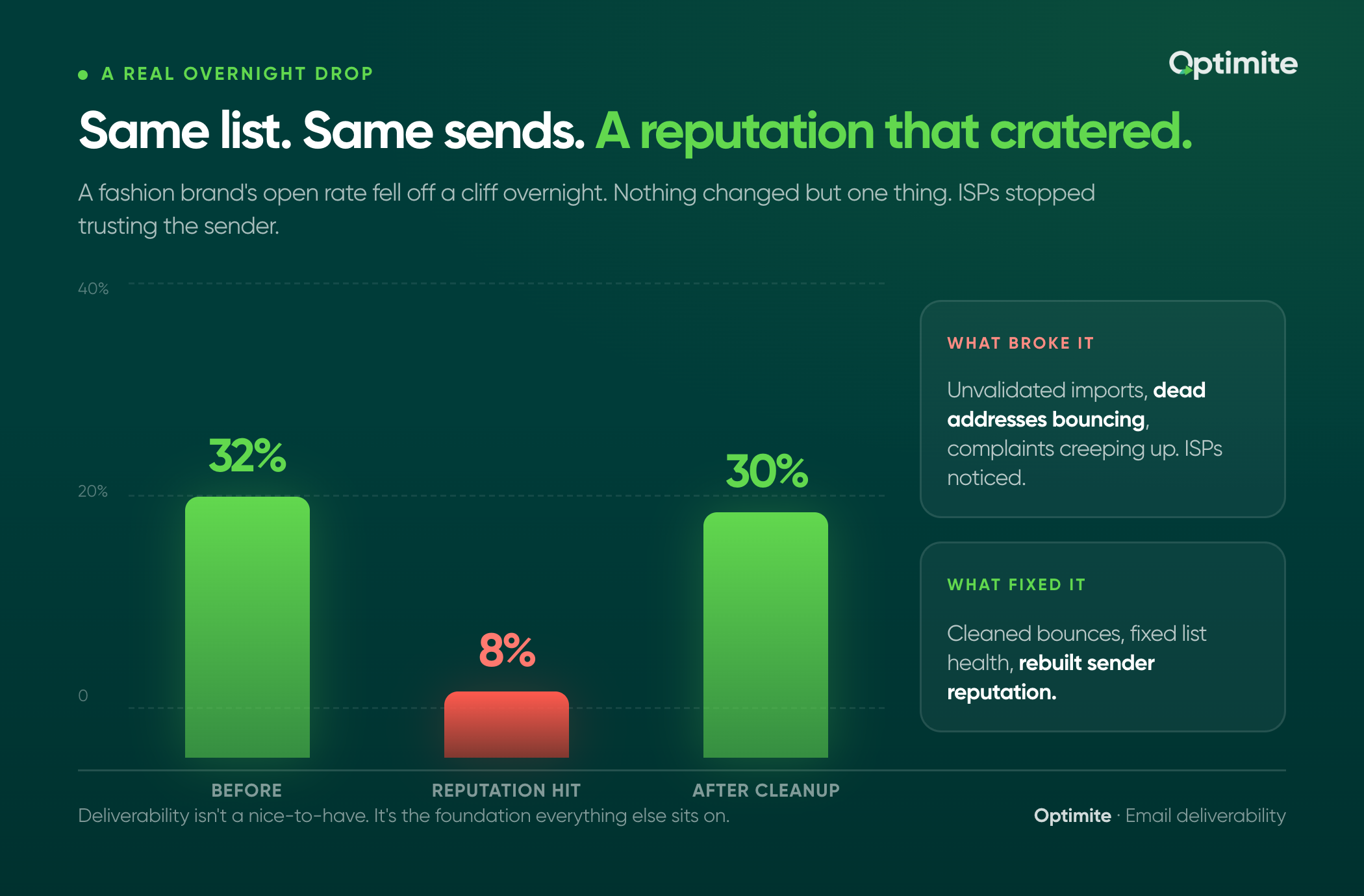
A fashion brand we work with had a 32% open rate. Then it dropped to 8% overnight. Same list. Same sends. Same strategy. Nothing changed except one thing: their sender reputation took a hit.
We've documented this scenario and similar deliverability fixes in our case studies. They spent two weeks diagnosing the problem. ISPs had started marking their emails as spam because their list health had degraded. They'd been importing list segments without validating them. Dead email addresses were bouncing. Spam complaints were creeping up. ISPs noticed.
Once they fixed the list health issues, cleaned up the bounces, and re-established their sender reputation, the open rate came back to 30%. Same email. Different reputation. Completely different outcome.
That's why deliverability matters. It's not a nice-to-have. It's foundational.
Your list health is the foundation
Before you worry about sender reputation or authentication, fix your list.
List health is simple: what percentage of your list is actually valid?
A valid email address is one that exists, belongs to an actual person or business, and can receive email. An invalid email is a typo, a fake address someone used at signup, a dead address that bounced, or a spam trap.
If 10% of your list is invalid, ISPs notice. They see bounces. They see complaints. They mark your sender as spam.
Here's what most brands do wrong: they import a list without validating it. They buy a list from someone sketchy. They capture emails without confirmation. Then they send to all of it.
Bad emails start piling up. Bounces go up. ISPs get annoyed. Your reputation tanks.
Here's how to fix it:
Step 1: Audit your current list In Klaviyo, go to Lists and Segments. Look at your main list. How many people are on it? Now check your bounced email reports. What percentage of your list is hard bounces (permanently invalid) or soft bounces (temporarily unreachable)?
If more than 5% of your list is hard bounces, you have a problem. That's a red flag that your list quality is poor.
Step 2: Remove hard bounces Hard bounces should be deleted. These are addresses that don't exist. Keeping them damages your reputation. In Klaviyo, create a segment of all hard bounces and remove them from your main list.
Step 3: Clean up inactive addresses If someone hasn't opened an email in 6 months, they're not engaged. They might be a spam trap. ISPs use spam traps to identify senders who email people who don't want email. Sending to inactive addresses increases your risk.
Create a segment of inactive people (no opens in 180 days) and either remove them or move them to a re-engagement flow. If they don't re-engage after the flow, delete them.
Step 4: Stop importing bad data Going forward, validate email addresses at signup. Use a double opt-in. Require email confirmation before adding someone to your list. This prevents typos and fake addresses from polluting your list in the first place.
The four culprits that tank deliverability
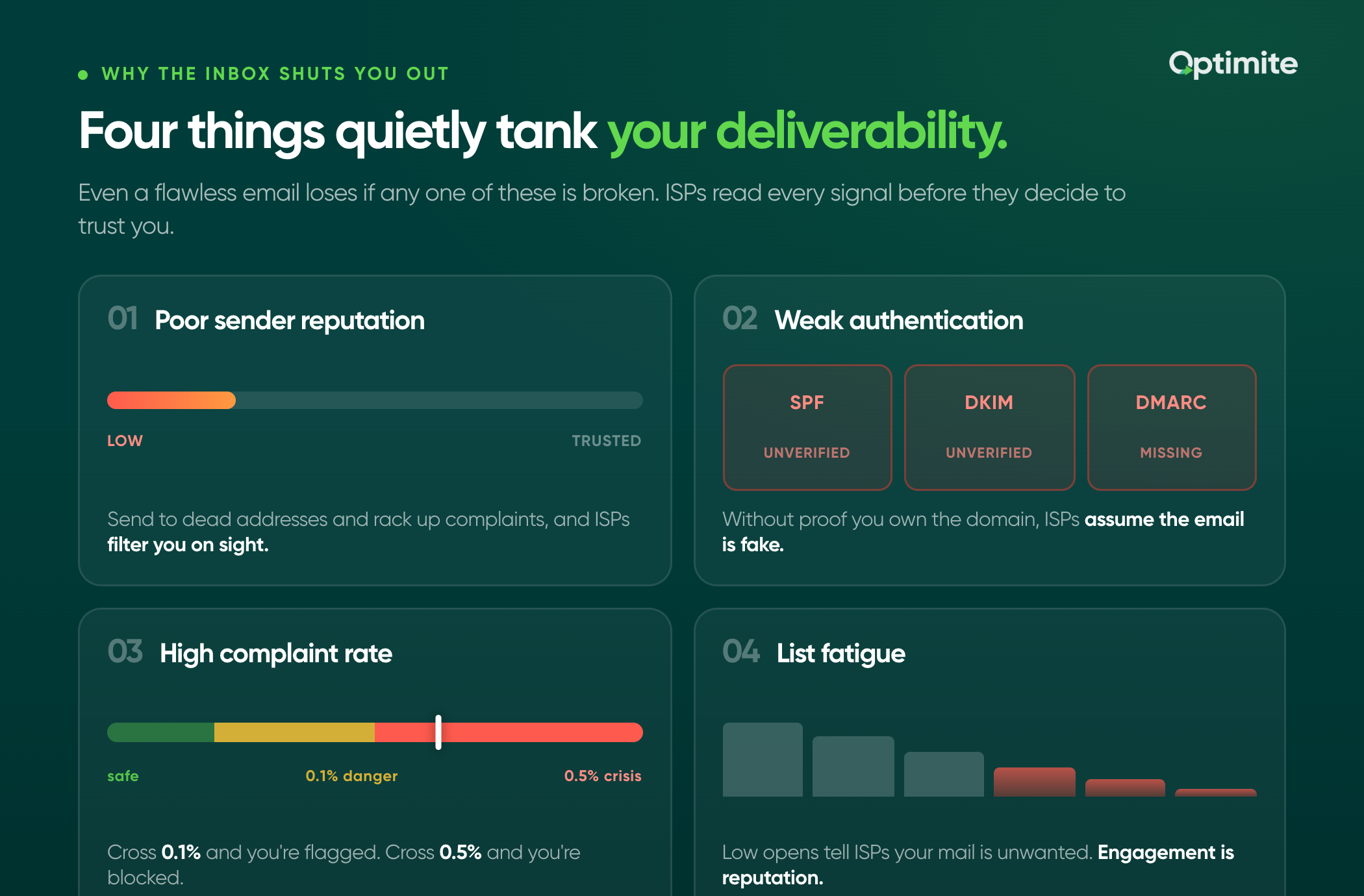
List health is foundational. But there are four other things that destroy deliverability:
Culprit 1: Poor sender reputation ISPs track your sender reputation. How many emails do you send? What percentage bounce? What percentage get reported as spam? ISPs use this data to decide: should I trust this sender?
If your reputation is poor, ISPs filter your emails to spam automatically. Even if your email is perfect.
You build sender reputation by sending to valid addresses, getting opens and clicks, and respecting unsubscribe requests. You destroy it by sending to invalid addresses, getting complaints, or ignoring unsubscribes.
Culprit 2: Weak authentication Authentication proves you own the domain you're sending from. It tells ISPs: this is really Optimite, not someone spoofing Optimite's domain.
Without proper authentication, ISPs assume your email is fake. They send it to spam.
Culprit 3: High complaint rate When someone marks your email as spam, ISPs record that. They track it. If your complaint rate gets too high, ISPs block you automatically.
A complaint rate above 0.1% is dangerous. Above 0.5% is a crisis.
Culprit 4: List fatigue and engagement collapse If people stop opening your emails, ISPs notice. They use engagement as a signal of whether your email is wanted. Low engagement equals low reputation.
Sending too frequently, poor segmentation, or irrelevant content all tank engagement. Which tanks reputation. Which kills deliverability.
Sender authentication and domain reputation in Klaviyo
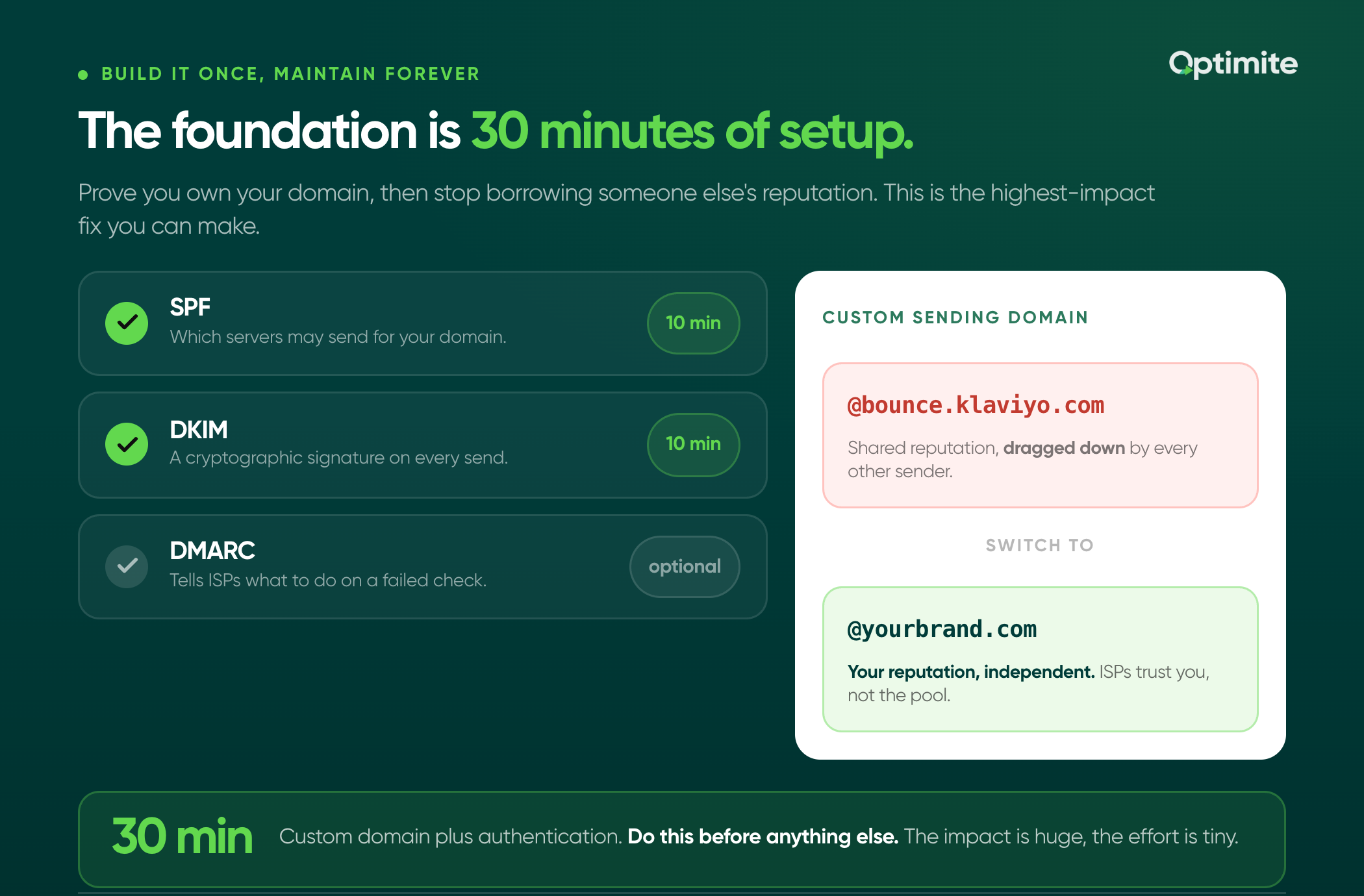
Authentication is technical but non-negotiable.
You need three things:
SPF (Sender Policy Framework) This tells ISPs which mail servers are allowed to send emails from your domain. Without SPF, ISPs can't verify you own the domain.
In Klaviyo, go to Account Settings > API Keys > Email Settings. You'll see your SPF record. Add it to your domain's DNS settings. This takes 10 minutes.
DKIM (Domain Keys Identified Mail) This cryptographically signs your emails to prove they came from you. It's stronger than SPF.
Klaviyo generates a DKIM record for you. Add it to your domain DNS. Same process as SPF.
DMARC (Domain-Based Message Authentication) This ties SPF and DKIM together. It tells ISPs what to do if an email fails SPF or DKIM checks.
You don't need DMARC to get good deliverability. But it helps. Set it up after SPF and DKIM are working.
Custom sending domain This is critical. Don't send from @klavioy.com or @bounce.klaviyo.com. Send from your own domain (@yourcompany.com).
Why? Because Klaviyo sends emails from thousands of brands. If one brand has terrible sender reputation, it affects everyone. Your domain reputation gets dragged down by other senders.
With a custom sending domain, your reputation is independent. Your emails are sent from @yourcompany.com. ISPs trust your reputation, not Klaviyo's shared reputation.
In Klaviyo, set up a custom sending domain in Account Settings. It takes 15 minutes.
Engagement signals matter more than you think
ISPs don't just look at bounces and complaints. They look at engagement.
If 10,000 people receive your email and only 100 open it, ISPs see that. They think: this sender's emails are not wanted. Send them to spam.
Engagement is a signal of list quality and email relevance.
Here's how to keep engagement high:
Only send to engaged segments If someone hasn't opened an email in 6 months, remove them from campaigns. Send them to a re-engagement flow or delete them. Don't send to them just because they're on your list.
Segment by behavior A customer who bought 3 months ago is different from someone who signed up yesterday and never bought. Send them different emails. Different cadence. Different products. Match the message to the person.
Respect frequency preferences Let people choose how often they hear from you. Some want daily emails. Some want weekly. Some want monthly. Respect their preference. This increases engagement and decreases complaints.
Clean your list regularly Every quarter, audit your list. Remove hard bounces. Remove people with no engagement in 6 months. Remove people who complained. Smaller, cleaner lists have better engagement and reputation.
The quick audit: check these five things right now
You don't need to wait for a crisis. Audit your list now.
Check 1: Hard bounce rate In Klaviyo, go to Reports > Email Reports. Look at your overall hard bounce rate across all campaigns in the last 90 days. If it's above 1%, you have a problem. Above 5%, you have a crisis.
Check 2: Complaint rate Same place. Look at complaints as a percentage of emails delivered. Anything above 0.1% is worth investigating. Above 0.5% is a crisis.
Check 3: List growth rate How much of your list is inactive (no opens in 6 months)? If more than 30% of your list is inactive, you're sending to dead weight. This tanks reputation.
Check 4: SPF and DKIM status In Klaviyo Account Settings > Email Settings, check your authentication status. Both SPF and DKIM should show as verified. If either says "not verified," fix it. This is low-hanging fruit.
Check 5: Sending domain What domain are you sending from? If it's @klaviyo.com or similar, you're using Klaviyo's shared reputation. Switch to a custom sending domain. This is one of the highest-impact changes you can make.
Fixing what's broken: step-by-step
If you find problems in the audit, here's the order to fix them:
Priority 1: Set up custom sending domain and authentication This is foundational. Do this first. It takes 30 minutes total. The impact is huge.
Priority 2: Remove hard bounces and invalid emails Create a segment of hard-bounced addresses in Klaviyo. Delete them from your main list. This stops the bleeding immediately.
Priority 3: Clean up inactive subscribers Create a segment of inactive people (no opens in 180 days). Either remove them or send them a re-engagement email. If they don't engage, delete them.
Priority 4: Segment your sends by engagement Don't send to your whole list. Segment by recent engagement. Recent engagers get your standard cadence. Inactive subscribers get a re-engagement flow or nothing.
Priority 5: Respect unsubscribe requests This seems obvious, but some brands ignore it. Someone unsubscribes? Remove them from all future sends. Don't try to win them back with a special offer. Just delete them. ISPs track this. If you ignore unsubscribes, reputation tanks.
Priority 6: Monitor and maintain Once you've fixed the foundation, keep it clean. Quarterly audits. Monitor bounce rate and complaint rate. Watch engagement. Maintain reputation by respecting your list and your subscribers.
Deliverability is boring. It's not exciting like building a new campaign or optimizing copy. But it's foundational.
You can have the perfect email. You can have the perfect list. You can have perfect segmentation. But if your email lands in spam, none of it matters.
Fix your foundation first. Custom sending domain. Authentication. Clean list. High engagement. Once you have that, your emails reach inboxes. Then all your other work actually matters.
Need help diagnosing your deliverability issues? Book a call and let's audit your setup.


