

First-Party Data Collection on Shopify Without Breaking Privacy
Third-party cookies are gone. Here's how to build a Shopify tracking layer that collects first-party data legally and at scale.
 Arpit Mehar
8 min read
You have a complete view of what happened on your Shopify store. Someone visited the product page. They clicked the reviews. They added to cart. They purchased.
What you don't have is why. Why did they buy? Will they buy again? What's the likelihood they'll need this in 60 days? Without that layer of insight, retention becomes guessing.
This is the first-party data problem. And it's not about collecting data for the sake of it. It's about building infrastructure that survives every privacy update, improves retention, and keeps your Shopify store competitive as third-party cookies disappear for good.
What first-party data actually is
First-party data is information you collect directly from visitors on your Shopify store. Page views. Product clicks. Purchase history. Customer lifetime value. Time between purchases. Device type. Geographic location. Repeat visit frequency. All of it.
It's different from third-party cookies, which track customers across the web (now largely gone). It's also different from zero-party data, which is what customers tell you directly through quizzes, surveys, and preference centers. If you're building retention infrastructure, you need both. First-party data is what you measure. Zero-party data is what they volunteer. Combined, they give you the complete picture.
First-party data is behavioral. It's what you measure about what customers actually do on your store. And unlike third-party cookies, it doesn't disappear when browsers change, Apple adds privacy features, or Google updates its policies. You own the data. You collected it on your domain. It survives every privacy update.
For Shopify stores, this matters because you're not relying on Meta's ad signal or Google's lookalike audiences. You're building your own foundation.
87% of ecommerce stores don't have proper first-party data infrastructure. Most can't answer: "Why do my repeat customers buy?" Without that answer, retention campaigns are generic.
The privacy landscape that actually applies to your store
Before you build, you need to know what you can legally collect. The rules have changed, and most Shopify stores haven't caught up.
GDPR applies if you sell to customers in the EU. Requires explicit consent before tracking. Gives customers the right to access, delete, and port their data. Violations can cost up to 20 million euros or 4% of global revenue.
CCPA applies in California. Similar consent requirements, with slightly different mechanics. CPRA (the updated version) expands this further.
iOS ATT changed how tracking works on iPhones. iOS 14.5+ requires apps to ask permission before tracking. Consent rates are low, meaning a huge percentage of your traffic is untracked on Safari.
Google Analytics 4 now requires consent mode configuration. You must tell GA4 whether the user has given consent, and GA4 adjusts how it tracks accordingly.
The practical question: What can you legally track on Shopify in 2026? The answer: almost everything, as long as you ask for permission first.
Most stores collect tracking data without consent infrastructure. If you're selling in GDPR regions and don't have a consent banner, you're opening yourself to enforcement action. This is where regulators are actively investigating.
The Shopify plus GA4 foundation
Your tracking infrastructure rests on three layers. Shopify pixel (native), Google Analytics 4 (web analytics), and first-party cookies (stored on your domain). None of these alone gives you the full picture. Together, they do.
Start with the Shopify pixel. It collects by default: product views, add-to-cart events, purchases, page views. You add on top of it: custom JavaScript events, user ID tracking (when customers log in), and metadata about which products are purchased.
GA4 is where the analysis happens. You wire Shopify purchase data into GA4 using the native integration. GA4 then tracks user journeys: which traffic source led to purchase, how many sessions before someone converts, do returning customers behave differently than first-time buyers.
First-party cookies are the glue. They live on your shopify store domain and persist across sessions. They survive browser updates and ad blockers more reliably than third-party cookies. They store information like user preferences, repeat purchase signals, and consent state.
Here's the implementation checklist:
- Enable enhanced ecommerce tracking in GA4 (purchase data, product views, cart interactions)
- Set up user-ID tracking in GA4 so returning customers are recognized across sessions
- Configure GA4 consent mode before turning on data collection
- Add custom Shopify pixel events for anything beyond the defaults (post-purchase email engagement, custom product recommendations, loyalty tier changes)
- Wire Shopify customer records into Klaviyo so purchase history flows automatically
The most common failure point: GA4 is collecting data but it never reaches Klaviyo. Data sits in GA4 looking pretty. Flows remain generic because they don't have the behavioral context they need.
Before you turn on GA4, map where the data needs to flow. Shopify pixel to GA4. GA4 to Klaviyo. Klaviyo segments to email flows. If a piece of data isn't connected to something that changes what you send, cut it. Data you collect but don't use is just technical debt.
Consent management: the piece everyone skips
Consent banners exist for legal reasons. But they also shape how your customers perceive your store. A generic "we use cookies" banner that everyone clicks through doesn't give you insight. A specific, segmented consent banner does.
The better approach: separate consent choices. Analytics only, marketing cookies, essential cookies. Let customers see what each choice means. When a customer opts into marketing cookies, they're telling you something about themselves.
Tools that work well with Shopify: Termly, CookieBot, OneTrust (if you're enterprise), or Shopify apps like Osano. They all wire into GA4's consent mode so GA4 knows whether consent was given.
Here's what happens when you wire it correctly: customer lands on your store, consent banner appears, they select preferences, consent state is stored in a first-party cookie, GA4 sees the consent state and adjusts tracking accordingly, consent choice gets logged in Klaviyo so you can segment by "customers who opted into marketing" vs. "customers who declined."
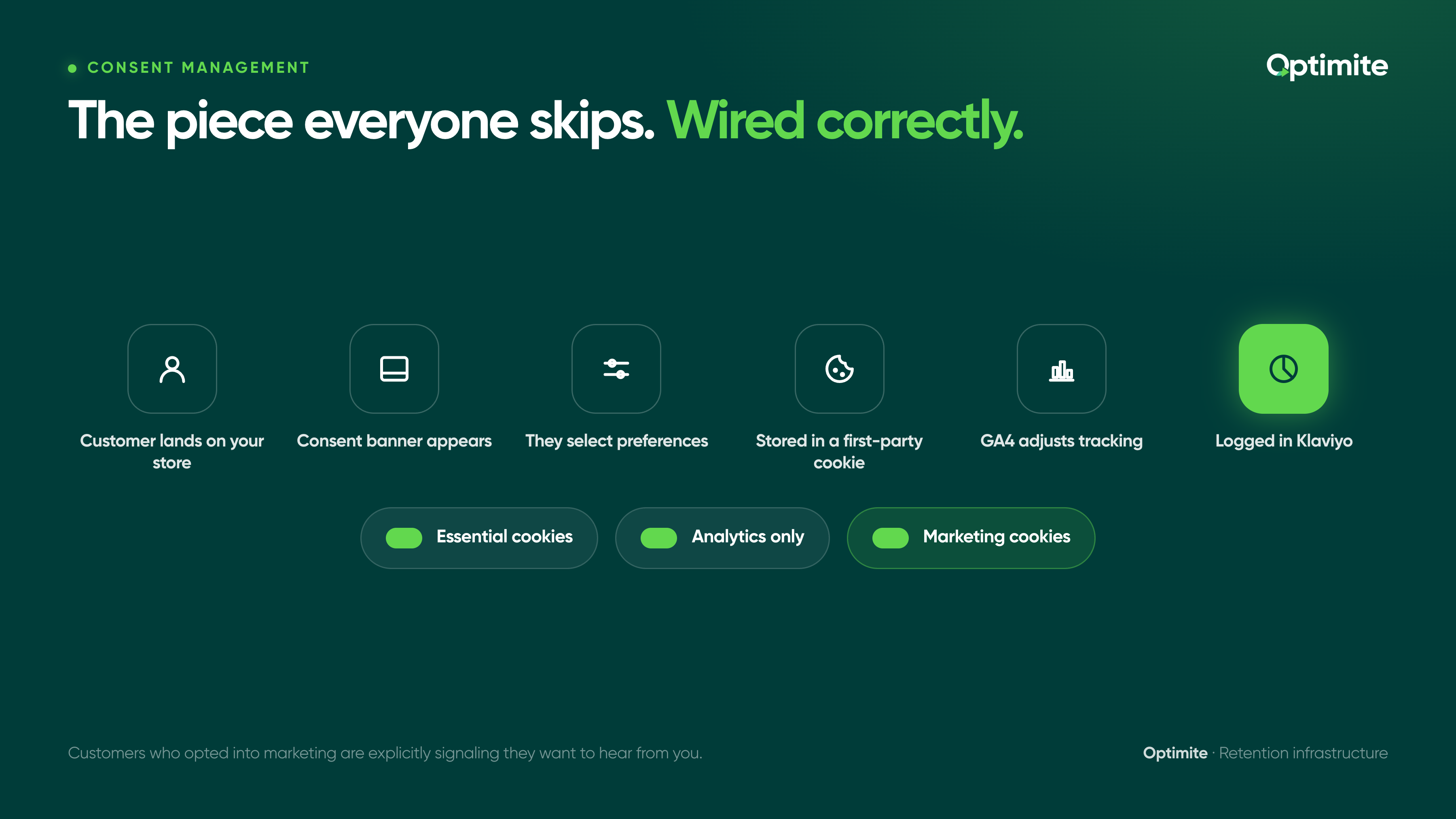
That last piece is powerful. Customers who opted into marketing are explicitly signaling they want to hear from you. Segment on this. Send them more. The unsubscribe rate will be lower, engagement higher, and list quality better.
Building your first-party data foundation: the three-layer model
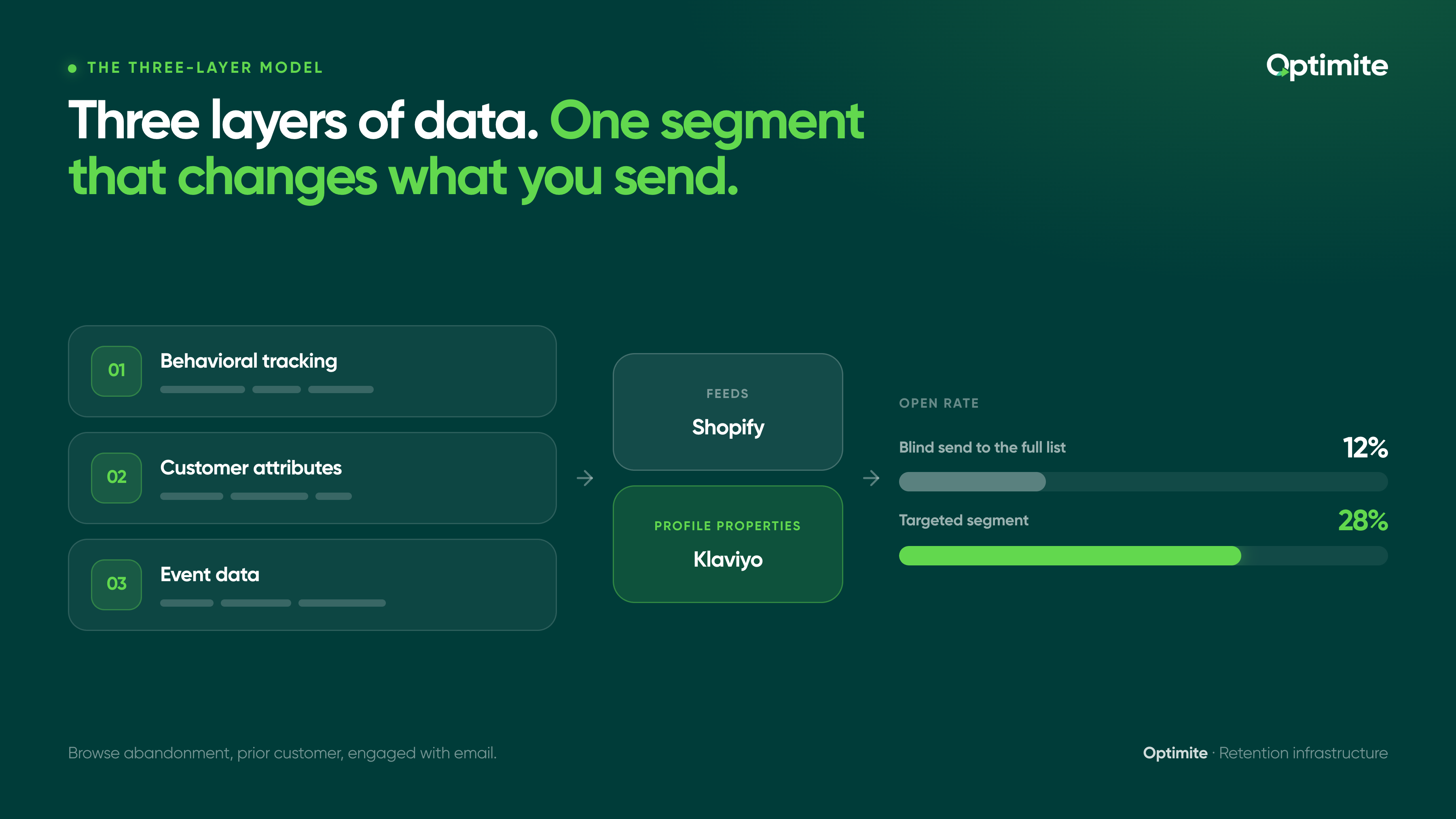
Once consent is in place, data flows through three layers.
Layer 1 is behavioral tracking. Page views. Product clicks. Add-to-cart events. Browse abandonment. Time on site. Device type. Traffic source. Repeat visit frequency. Days between purchases.
Layer 2 is customer attributes. Purchase history. Customer lifetime value calculated in Shopify. Email confirmation status. Geographic location. Account creation date. Loyalty program status.
Layer 3 is event data from downstream channels. Did they open the post-purchase email? Click it? Reply to SMS? File a support ticket? Return the product? All of this data comes back to the customer record.
All three layers feed into Shopify via a combination of the Shopify pixel, GA4 integration, and native Shopify customer records. From Shopify, data flows into Klaviyo as profile properties. From Klaviyo, flows and segments use this data to decide what to send and when.
Example: A wellness brand using the three-layer model. Layer 1 tells them a customer browsed their supplement stack but hasn't purchased yet. Layer 2 tells them this customer bought skincare six months ago. Layer 3 tells them they opened the browse-abandonment email. Segment these customers as "browse abandonment, prior customer, engaged with email." Send them a personalized recommendation email that references the specific category they were looking at plus a relevant product from their previous purchase.
Blind send to the full list would get 12% open rate. This segment gets 28% open rate because every element is targeted. This is where advanced segmentation in Klaviyo becomes powerful, combining data layers into segments that actually change what you send.
Connecting first-party data to retention: repeat purchase prediction
First-party data is only useful if it predicts something. The most useful prediction for a retention program is: will this customer buy again?
Repeat purchase signals vary by vertical. For a wellness brand, days since purchase plus product category is 60-70% accurate. A customer who bought supplements 85 days ago from the replenishment category is likely shopping soon.
For fashion, it's different. Purchase recency matters less. Purchase frequency pattern matters more. Did they buy every 30 days last quarter? They'll probably buy next month too.
For food and beverage, it's seasonality plus frequency. Someone who orders every three weeks will pause in December, resume in January.
Start with one repeat purchase signal per vertical. Implement it. Measure its accuracy against actual repeat purchases. Add more signals after you've validated the first one.
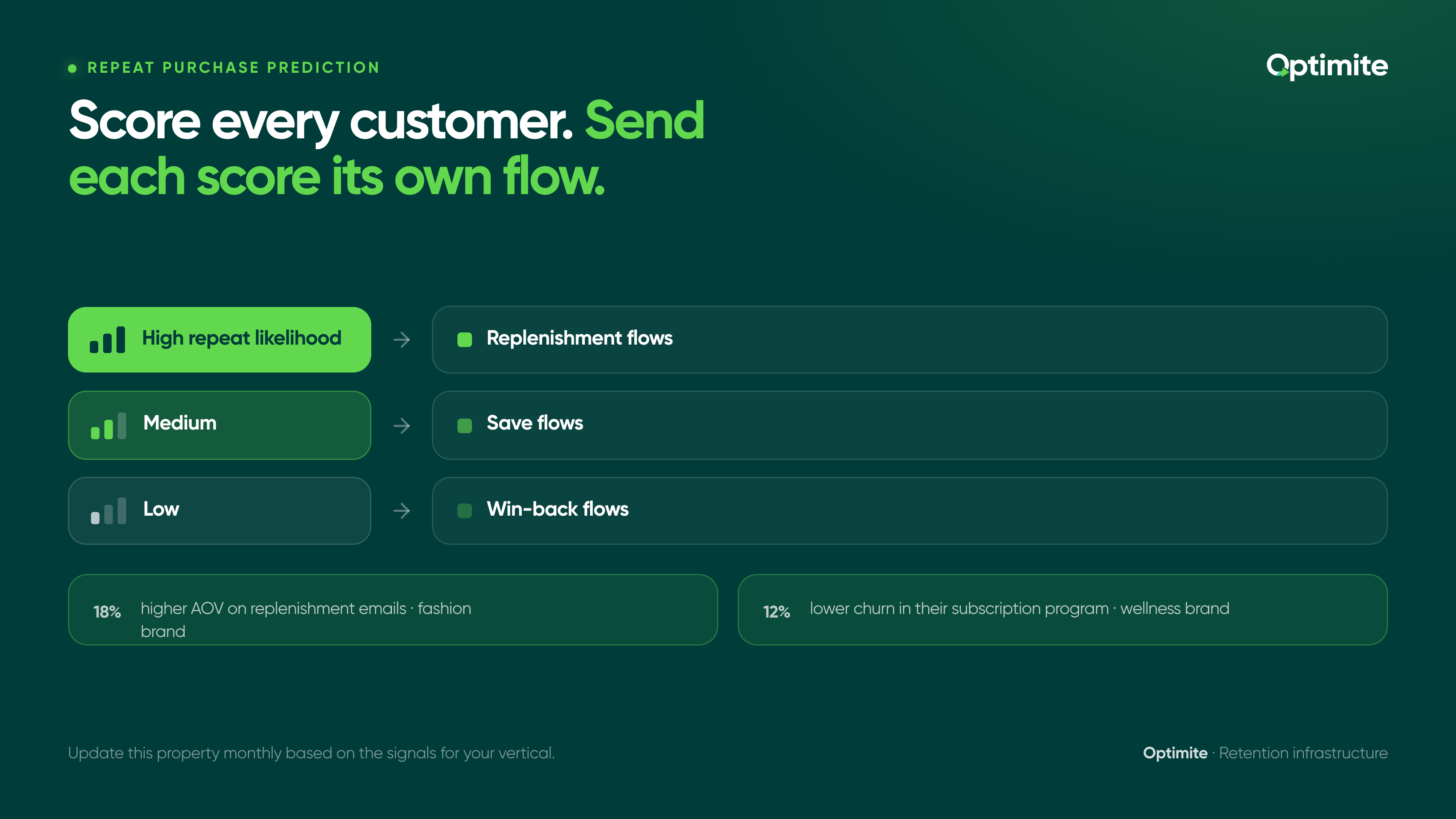
How to implement: create a custom Shopify property that marks customers as "high repeat likelihood," "medium," or "low." Update this property monthly based on the signals for your vertical. Segment Klaviyo on this property. Send replenishment flows to high-likelihood customers, save flows to medium-likelihood customers, win-back flows to low-likelihood customers.
A fashion brand doing $5M in revenue saw 18% higher AOV on replenishment emails after implementing repeat purchase scoring. A wellness brand saw 12% lower churn in their subscription program.
Common first-party data mistakes Shopify stores make
Mistake 1: Collecting data without consent infrastructure. Most Shopify stores using GA4 without a consent banner. Avoid this by deploying consent management before turning on tracking.
Mistake 2: GA4 connected to Shopify but not to Klaviyo. Data collects beautifully in GA4. Flows remain generic because they don't have the data. Avoid this by mapping integrations before launch.
Mistake 3: Tracking everything because you can. Fifty custom events. Seventy profile properties. Complexity with no payoff. Avoid this by asking: will I use this data in a segment or flow? If not, cut it.
Mistake 4: No first-party cookie strategy. Cookies are set to session-only duration. They disappear when the browser closes. When third-party tracking becomes even more restricted, you lose visibility. Avoid this by setting cookie retention to 90 days or 1 year depending on your business cycle.
Mistake 5: Consent state not connected to Klaviyo. You know whether someone consented to marketing. You don't use it. List quality suffers. Avoid this by creating a Klaviyo property for consent state, updating it with every consent change, segmenting on it, and being more aggressive with marketing emails to customers who explicitly opted in.
Don't launch GA4 without testing consent mode first. Set up a test property, enable consent mode, give your own browser only partial consent, and verify GA4 respects it. If GA4 is collecting data from non-consenting users, you'll discover that during a data privacy audit. Better to catch it now.
The data moat
Brands that build first-party data infrastructure now have a 12-18 month head start. As third-party tracking becomes even more restricted, brands without owned data infrastructure will fall behind fast.
The cost of building this now is low. Consent banner: one day of setup. GA4 enhanced tracking: one afternoon. Klaviyo integration: one day. Repeat purchase scoring: one week. Total time investment for a store your size: 2-3 weeks to build, then ongoing refinement.
The cost of retrofitting this later when you're losing customers to competitors with better retention: much higher.
First-party data plus zero-party data (what customers tell you) creates a complete retention picture. You know what they do and why they do it. You can send them things that actually match their needs. Retention improves. List health improves. Repeat rate improves.
Start with one piece. Consent management. Or GA4 tracking. Or repeat purchase scoring. Pick the one that would move your numbers the most if it worked. Build it right. Measure it. Then add the next layer.
Your Shopify store is collecting data whether you're paying attention or not. The question is whether that data flows into your retention program or sits untouched. Build the plumbing now. Your repeat customers will thank you.
Want help auditing your Shopify retention infrastructure or mapping out your data stack? Book a free retention call. We work with Shopify stores across wellness, beauty, fashion, and food and beverage to build first-party data infrastructure that drives real retention lift.


